Bookkeeping

Cybersecurity for Small Businesses: Simple Steps to Protect Your Data and Your Business

For many small business owners, cybersecurity can feel like something only large corporations need to worry about. The reality is quite different. Small businesses are increasingly targeted by cybercriminals because they often lack the security measures and training that larger organizations have in place.

The good news is that improving your cybersecurity does not require a massive budget or a full-time IT department. By implementing a few practical safeguards and developing smart habits, you can significantly reduce risk and better protect your business, employees, customers, and reputation.

Why Cybersecurity Matters for Small Businesses

A cybersecurity incident can impact much more than your computers. It can disrupt operations, damage customer trust, and create unexpected expenses that are difficult for a small business to absorb.

Common consequences of cyberattacks include:

  • Financial losses from fraud or stolen funds
  • Downtime caused by ransomware or system outages
  • Data breaches involving customer or employee information
  • Compliance and legal issues
  • Damage to your company’s reputation
  • Permanent loss of important files and records

In today’s digital world, cybersecurity is no longer optional. It is an essential part of protecting the future of your business.

Strengthen Passwords and Access Controls

Weak passwords remain one of the leading causes of data breaches. A strong password policy is one of the easiest ways to improve your cybersecurity.

Use a Password Manager

Password management tools like LastPass, Keeper, or 1Password securely store passwords and help employees use strong, unique credentials for every account.

Enable Multi-Factor Authentication (MFA)

Multi-factor authentication adds an extra layer of security by requiring users to verify their identity through a second method, such as a text message or authentication app.

Limit User Access

Employees should only have access to the systems and information needed to do their jobs. Regularly review user permissions and immediately remove access for former employees or contractors.

Keep Software and Devices Updated

Outdated software often contains known security vulnerabilities that hackers can exploit.

Make sure automatic updates are enabled for:

  • Operating systems
  • Web browsers
  • Antivirus software
  • Firewalls
  • Business applications and cloud platforms

If a computer or software application is no longer supported by the manufacturer, it may be time to upgrade. Running outdated technology can create unnecessary security risks.

Train Employees to Spot Cyber Threats

Technology alone cannot protect your business. Employee awareness plays a critical role in cybersecurity.

Provide regular training on how to identify:

  • Phishing emails
  • Fake login pages
  • Suspicious attachments
  • Unexpected requests for passwords or payments
  • Unfamiliar links and websites

A brief cybersecurity training session each month can help employees recognize threats before they become costly problems.

Secure Your Network and Devices

Strong cybersecurity starts with a secure infrastructure.

Protect Your Wi-Fi Network

Take steps to strengthen your business network by:

  • Using a business-grade router
  • Changing default passwords
  • Enabling network encryption
  • Creating a separate guest network for visitors

Secure Business Devices

Require security measures such as:

  • Screen locks
  • Device encryption
  • Secure remote access tools
  • Mobile device security policies

Small improvements in device security can greatly reduce the likelihood of unauthorized access.

Back Up Your Data Regularly

Even the best cybersecurity strategy cannot prevent every incident. Reliable backups ensure your business can recover quickly if something goes wrong.

Follow the 3-2-1 backup rule:

  • Keep three copies of your data
  • Store backups in two different formats
  • Maintain one copy offsite or in the cloud

Regular backups can protect your business from ransomware attacks, hardware failures, and accidental file deletions.

Evaluate the Security of Your Vendors

Many small businesses rely on third-party software and cloud-based platforms. The security of those vendors directly impacts your business.

Ask vendors:

  • How is customer data protected?
  • Do you support multi-factor authentication?
  • What security certifications or standards do you follow?
  • How are customers notified if a breach occurs?

This is especially important for organizations that handle sensitive information, including healthcare providers, nonprofits, financial firms, and legal practices.

Create a Cybersecurity Response Plan

No business wants to experience a cyber incident, but having a plan in place can make recovery faster and less stressful.

A simple response plan should include:

  • Emergency contacts
  • Backup locations and recovery procedures
  • Steps for securing compromised accounts
  • Internal communication responsibilities
  • Procedures for resetting passwords and removing threats

The goal is not perfection. The goal is to be prepared.

Cybersecurity Is Not Optional—But It Is Achievable

Cybersecurity does not have to be overwhelming. By strengthening passwords, keeping systems updated, training employees, securing devices, and maintaining reliable backups, small businesses can significantly reduce their risk of a cyberattack.

The most effective cybersecurity strategy starts with consistent, proactive habits. Small improvements made today can help prevent major problems tomorrow.

If you’re looking to improve your cybersecurity posture, review your technology environment, or implement practical security measures, the IT & Cyber Support team at RPS can help you build a stronger, safer foundation for your business.

Cybersecurity for Small Businesses: Simple Steps to Protect Your Data and Your Business Read More »

Back to Business: Advanced Bookkeeping Strategies for a Strong Finish to the Year

As summer comes to an end, many business owners shift into what feels like a “back-to-business” season. Teams return from vacation, schedules become more consistent, and attention turns toward achieving year-end goals. This makes August an ideal time to review your bookkeeping and payroll processes to ensure your financial systems are accurate, efficient, and ready to support growth.

Advanced bookkeeping is not about adding complexity. It is about creating financial clarity, improving accuracy, and gaining better insights into your business performance. By strengthening your bookkeeping practices now, you can enter the final months of the year with confidence and make more informed decisions for your business.

Why Advanced Bookkeeping Matters

Strong bookkeeping serves as the foundation for effective financial management. If you’ve experienced issues such as delayed reconciliations, missing receipts, payroll challenges, or cash flow uncertainty during the first half of the year, now is the perfect time to make improvements.

Advanced bookkeeping can help your business:

  • Reduce accounting errors and manual rework
  • Improve payroll accuracy and compliance
  • Gain greater visibility into cash flow
  • Streamline invoicing and bill payments
  • Support better financial reporting
  • Make data-driven business decisions

When your financial records are accurate and up to date, you spend less time fixing problems and more time planning for growth.

Review and Refine Your Chart of Accounts

Your chart of accounts should evolve as your business grows. A well-structured chart of accounts improves reporting accuracy and provides clearer insights into where your money comes from and where it goes.

Consider asking:

  • Are your revenue categories detailed enough to reflect your services accurately?
  • Do your expense categories help you track spending effectively?
  • Has your business outgrown the accounting structure you established several years ago?

Updating your chart of accounts can make financial reporting more meaningful and simplify tax preparation.

Automate Your Bookkeeping Processes

Bookkeeping automation is one of the most effective ways to save time and improve accuracy. Modern accounting software can help eliminate repetitive tasks while reducing the risk of human error.

Popular bookkeeping automation tools can streamline:

  • Receipt and expense tracking
  • Bank transaction categorization
  • Recurring invoices and payments
  • Invoice reminders and follow-ups
  • Bank and credit card feed imports

If you still rely heavily on manual data entry or spreadsheets, implementing automation can significantly improve efficiency and free up valuable time each month.

Improve Payroll Accuracy and Compliance

Payroll is one of the most important financial functions in any business. Inaccurate payroll can create compliance issues, employee frustration, and unnecessary expenses.

Review your payroll processes to ensure:

  • Employees are properly classified as W-2 employees or independent contractors
  • Payroll tax filings are current and accurate
  • Time tracking systems are reliable
  • Employee benefits and deductions are recorded correctly

Mid-year reviews are also a great opportunity to identify payroll adjustments, including tax rate changes, PTO accrual corrections, benefit contribution updates, and missing employee documentation.

Addressing payroll issues early can help prevent costly problems later in the year.

Reconcile More Than Just Bank Accounts

Many businesses regularly reconcile bank accounts but overlook other critical financial accounts. Comprehensive reconciliation provides a complete picture of your financial health.

Be sure to reconcile:

  • Business credit cards
  • Payment processors such as Stripe, Square, and PayPal
  • Loans and lines of credit
  • Vendor account balances
  • Customer deposits
  • Undeposited funds

Regular reconciliation helps identify discrepancies early and ensures your financial reports remain accurate.

Review Financial Reports Every Month

Consistent financial reporting helps business owners make proactive decisions rather than reacting to problems after they occur.

At a minimum, review these key reports each month:

Profit and Loss Statement

Monitor revenue, expenses, and overall profitability to identify trends and opportunities.

Balance Sheet

Evaluate assets, liabilities, and equity to understand your company’s financial position.

Cash Flow Statement

Track how money moves through your business and ensure you have sufficient cash to cover expenses and invest in growth.

Regular report reviews can reveal valuable insights that support smarter business decisions.

Create Documented Financial Workflows

One of the most overlooked bookkeeping best practices is documenting financial procedures. Clear workflows increase consistency, reduce errors, and make it easier to delegate tasks as your business grows.

Document processes such as:

  • Month-end closing procedures
  • Payroll submission timelines
  • Receipt and document storage
  • Vendor payment schedules
  • Invoicing and collections
  • Financial reporting deadlines

Having standardized procedures helps ensure financial tasks are completed accurately and on time, even when team members change.

Prepare Now for a Successful Year-End

The second half of the year is the perfect time to strengthen your bookkeeping systems and improve your financial workflows. By refining your processes, embracing automation, and reviewing key financial reports regularly, you can position your business for a stronger fourth quarter and a smoother tax season.

At Richardson Professional Solutions, we help business owners improve bookkeeping processes, maintain accurate payroll, and build reliable financial systems that support long-term success. If you’re ready for a mid-year financial review or want to enhance your bookkeeping operations, our team is here to help.

Back to Business: Advanced Bookkeeping Strategies for a Strong Finish to the Year Read More »

Mid‑Year Business Review & Planning: Refocus, Reassess, and Realign for 2026 Success 

July marks the halfway point of the year, an ideal moment to pause, reflect, and make strategic adjustments before rolling into Q3 and Q4. Whether your business has experienced growth, challenges, or both, a mid‑year review helps you understand what’s working, what’s not, and where your time and resources should go next. This month, we’re focusing on how to conduct a meaningful review, plan for the rest of the year, and leverage managed services and event support to propel your business forward. 

Why a Mid‑Year Review Matters 

A lot can happen in six months. Teams shift, goals change, priorities evolve, and new opportunities emerge. Mid‑year planning allows you to: 

  • Realign with your annual goals 
  • Catch operational or financial inefficiencies early 
  • Strengthen performance before year‑end 
  • Reset your team’s focus 
  • Identify opportunities that fit your strategic direction 

Without checking in mid‑year, you risk continuing old habits that no longer support your current vision. 

1. Review Your Goals and Key Metrics 

Start by revisiting the goals you set at the beginning of the year—both the measurable targets and the big‑picture intentions. 

Ask yourself: 

  • What goals have we already met or exceeded? 
  • Where are we falling behind, and why? 
  • Are there new goals we should adopt based on recent changes? 

Next, review your performance metrics. For most organizations, these include: 

  • Revenue and profit margins 
  • Customer or donor growth 
  • Website traffic and engagement 
  • Marketing performance 
  • Project completion rates 
  • Staff capacity and workload 

Instead of judging the numbers, focus on what they teach you. 

2. Evaluate Your Operations and Workflows 

Your workflows determine your productivity. Mid‑year is an excellent time to check for bottlenecks or outdated processes. 

Identify What’s Slowing You Down 

Look for: 

  • Repetitive manual tasks 
  • Delays in communication 
  • Overloaded team members 
  • Inefficient project systems 
  • Missing documentation 

A small operational tweak today can free up hours every week. 

Consider Managed Services 

If you’re wearing too many hats, outsourcing administrative, bookkeeping, IT, or marketing support can dramatically boost efficiency. Managed services keep your operations running smoothly while you focus on leadership and growth. 

3. Refresh Your Marketing and Event Strategy 

If you hosted events earlier this year—or have major events coming up—July is the perfect time to assess performance and plan. 

Reflect on Past Events 

  • Which events delivered strong ROI or engagement? 
  • Which ones need improvement? 
  • Did your team have enough support? 

Plan for Fall Events and Campaigns 

Autumn is one of the busiest seasons for business, fundraising, and community engagement. Preparing now ensures you’re not rushed in September. 

Event support; such as planning, coordination, materials, and promotion, can help you execute professionally without overwhelming your internal team. 

4. Conduct a Financial Health Check 

A mid‑year financial review helps you correct course before year‑end. 

Evaluate: 

  • Budget vs. actual spending 
  • Cash flow patterns 
  • Account balances 
  • Outstanding invoices or unpaid bills 
  • Subscription costs 
  • Service profitability 

Look for opportunities to cut costs, improve billing processes, or reallocate funds to high‑impact areas. 

5. Use a Simple Mid‑Year Planning Workbook 

Here’s a structure your planning workbook can follow: 

Section 1: Wins & Strengths 

List accomplishments and what contributed to them. 

Section 2: Challenges & Gaps 

Document barriers slowing you down. 

Section 3: Updated Goals 

Set 3–5 priorities for the rest of the year. 

Section 4: Action Plan 

Break goals into monthly or weekly steps. 

Section 5: Support Needed 

Identify where outside help—like managed services or event coordination—can lighten your load. 

Realign Now for a Strong Finish 

July is your chance to reset with intention. A thoughtful mid‑year review helps ensure that the second half of 2026 is strategic, productive, and aligned with your long‑term vision. With strong planning, refreshed workflows, and the right support, you can finish the year with clarity and momentum. 

If you’d like help facilitating your mid‑year review, building a planning workbook, or outsourcing operational tasks, our team atRPS is ready to support you. 

Schedule your Discovery Call Today!

Mid‑Year Business Review & Planning: Refocus, Reassess, and Realign for 2026 Success  Read More »

Spring Is Here. Let’s Tidy Up Your Books!

A Fresh Start for Your Finances This Season 

Spring is the season of clearing clutter, refreshing routines, and getting organized, and your business finances deserve the same energy. Whether you manage your own books or work with a bookkeeping partner, now is the perfect time to pause, review, and tidy up the numbers that keep your business moving. 

A clean set of books isn’t just about accuracy. It’s about clarity. It helps you understand where money is going, how profitable you really are, and what areas need attention before small issues turn into big headaches. This month, we’re diving into how to “spring clean” your books, focusing on reconciliations, cleanup tasks, and even a simple live‑audit style example you can follow. 

Why Spring Is the Perfect Time to Clean Your Books 

Just like your home gathers dust, your books collect clutter over time, duplicate entries, uncategorized transactions, outdated vendors, forgotten invoices, or mismatched balances. Spring is the ideal midpoint between tax season prep and mid-year planning, giving you space to: 

  • Catch errors early 
  • Tighten up processes 
  • Improve your reporting 
  • Identify money leaks 
  • Prepare for stronger Q2–Q4 decisions 

When your books are organized, your business feels lighter, clearer, and easier to manage. 

Step 1: Review Your Chart of Accounts 

Your chart of accounts is the foundation of clean bookkeeping. Over time, business owners often end up with too many categories, unused accounts, or inconsistent naming. Ask yourself: 

  • Does every category still have a purpose? 
  • Are there duplicates? 
  • Are income and expense accounts clearly labeled? 

Cleaning this up helps you and your accountant see a clearer financial picture. 

Step 2: Reconcile All Bank, Credit, and Payment Accounts 

Reconciliation is the heart of bookkeeping cleanup. It ensures your accounting software matches your actual bank balances. Make sure you reconcile: 

  • Checking accounts 
  • Savings accounts 
  • Credit cards 
  • PayPal, Stripe, Square 
  • Loans 
  • Lines of credit 

If the numbers don’t match, dig deeper. Even small discrepancies reveal important issues like double charges, missing deposits, or vendor errors. 

Step 3: Clean Up Past-Due Invoices and Unpaid Bills 

Businesses lose thousands every year simply from lack of follow‑up. Now is the time to: 

  • Send reminders for unpaid invoices 
  • Address long‑overdue customer balances 
  • Remove or write off uncollectible amounts 
  • Verify you’ve paid all outstanding bills 

Streamlining this process helps with cash flow and reduces stress throughout the year. 

Step 4: Review Subscription Spending 

Spring cleaning your books isn’t just about accuracy; it’s about saving money. Log into your bank and card accounts to review: 

  • Monthly software subscriptions 
  • Apps you don’t use anymore 
  • Auto-renewals you forgot about 

Canceling unused tools frees up dollars you can reinvest where it matters. 

Step 5: A Simple “Live Audit” You Can Try Today 

Here’s a quick real‑world example of a mini audit you can do on your books: 

  1. Choose one month from last year, preferably a busy one. 
  1. Open your bank, credit card, and payment processor statements. 
  1. Compare each transaction from your statements to what’s recorded in your bookkeeping software. 
  1. Look for missing transactions, duplicates, or incorrectly categorized items. 
  1. Flag anything that doesn’t make sense. 

Most business owners are shocked at finding subscription duplicates, old vendor charges, or missing income that never made it into their books. This simple audit can instantly improve accuracy and confidence. 

Step 6: Refresh Your Processes 

A clean set of books is great, but a clean system is even better. Consider setting up or improving: 

  • Automations for recurring expenses 
  • Bank rules in QuickBooks or Xero 
  • Digital receipt management 
  • A weekly or monthly bookkeeping check‑in 
  • Secure access control for financial documents 

Consistency prevents clutter from building back up. 

A Fresh Financial Start 

Spring cleaning your books helps you realign your goals, tighten your operations, and prepare for a strong year ahead. Your financial clarity impacts everything pricing, hiring, growth, cash flow, and peace of mind. 

If you need help conducting a deeper audit or want a bookkeeping partner to keep things clean all year long, our team at Richardson Professional Solutions is ready to support you. 

Book your consultation today!

Spring Is Here. Let’s Tidy Up Your Books! Read More »

Avoid the Tax‑Season Scramble: How to Prepare for Your CPA Visit 

Tax season doesn’t have to feel overwhelming. In fact, most tax‑season stress comes from one simple issue: lack of preparation. 

Many business owners aren’t sure what their CPA actually needs—or when they should start gathering it. The result is rushed meetings, unanswered questions, and missed opportunities. 

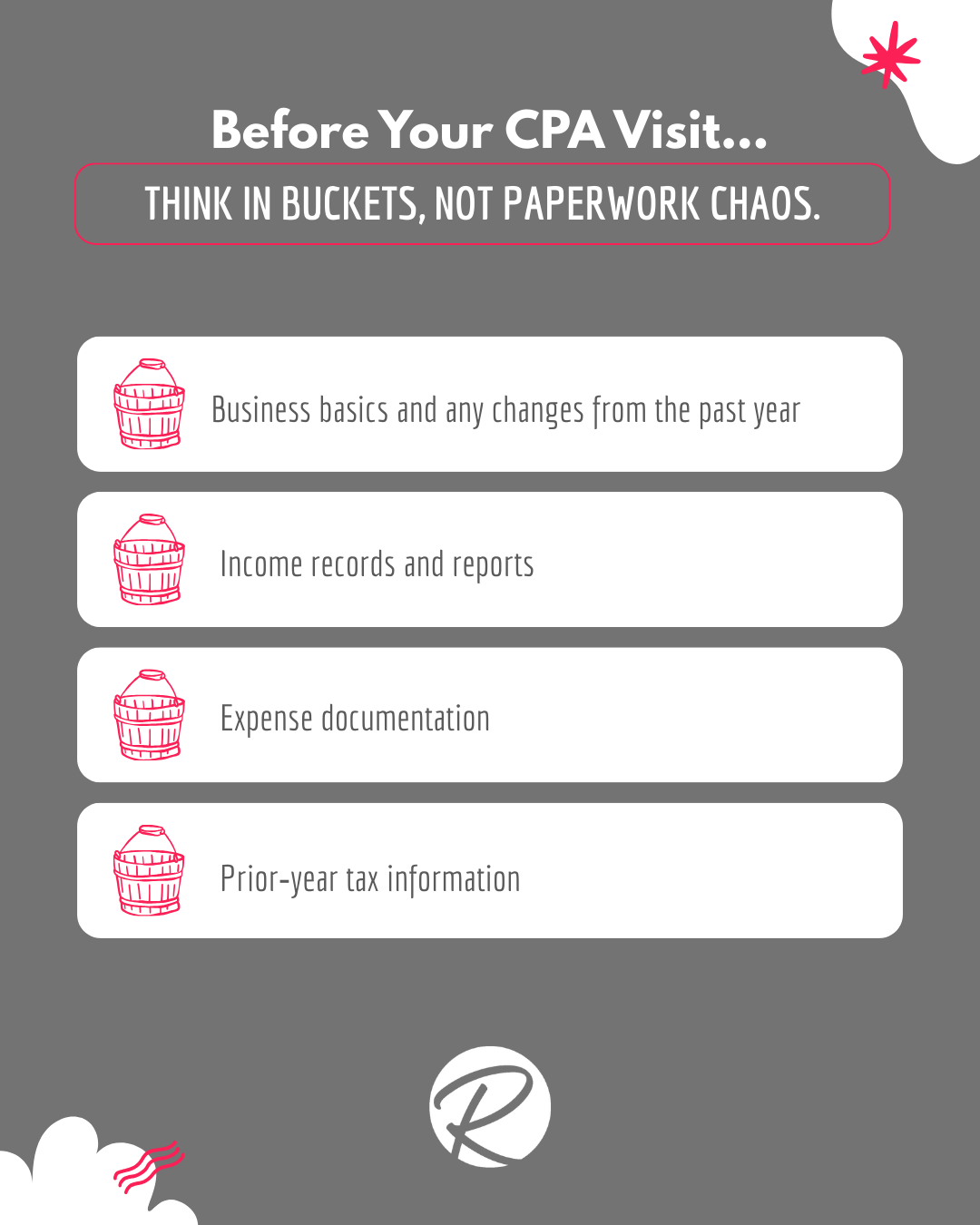
Start With the Right Documents 

Instead of thinking in terms of piles of paperwork, think in buckets: 

A good rule of thumb: if money hits your bank account, it likely needs to be reported. 

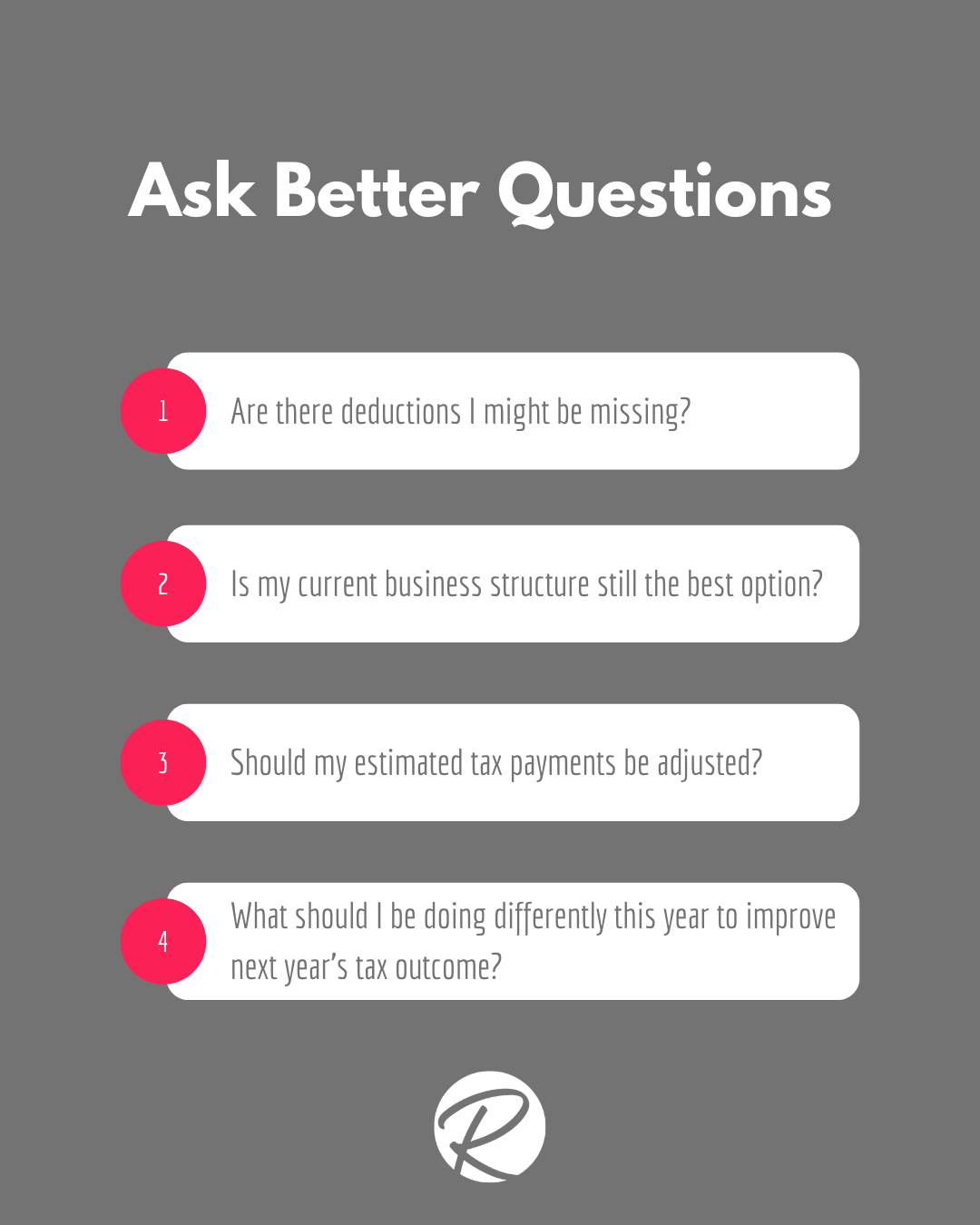
Ask Better Questions 

Your CPA is more than a tax filer—they’re a strategic partner. Come prepared to ask questions like: 

Avoid Common Mistakes 

Some of the most common tax‑time issues include mixing personal and business finances, missing transactions, guessing numbers, and waiting too long to ask questions. These mistakes are common—and avoidable. 

Stay Organized All Year 

Simple habits make a big difference: 

  • Monthly reviews of your accounts and Profit & Loss 
  • Quarterly check‑ins on estimated taxes 
  • Annual year‑end planning conversations 

The takeaway? Preparation saves time, money, and stress. Organization matters more than perfection, and better questions lead to better outcomes. 

If you’d like help staying organized or preparing for your CPA visit, our team is happy to support you. 

Avoid the Tax‑Season Scramble: How to Prepare for Your CPA Visit  Read More »

Setting Up Autopay in QuickBooks Online (QBO)

Learn how to set up automatic payments for recurring invoices! QuickBooks Online’s Autopay lets you make payments for recurring invoices automatically. You can sign up and enter your payment info through the invoice. Your payments will process automatically for future recurring invoices.

To setup Autopay:
1. Open your invoice and select “Set up autopay” to enroll.
2. Next, you will need to sign in using an Intuit user ID (also used for TurboTax and Mint). If you need to set one up, please see further instructions below.
3. You need to make sure the autopay checkbox shows as selected and displays the correct frequency and start date.
4. Once everything looks good, select the Autopay button to pay the current invoice. You will receive a confirmation email that Autopay is set up.

_____________________________________________

**Why am I still receiving an invoice via email, I am set up on Autopay?**
You will receive the invoice email normally, but it should reflect a zero balance, pending payment, or Autopay scheduled payment depending on the due date for the invoice.

**Can I change the amount of the Autopay?**
Autopay can only be set up for the full amount. If you edit the amount, then the Autopay option no longer displays.

**How do I set up an Intuit account?**
You need an Intuit account to use Autopay. If you don’t have an Intuit account, you’ll need to create a new login (https://accounts.intuit.com/index.html?_ga=2.176293925.1061788638.1732654131-1548149096.1708010766).

**What kind of payment methods can I use to set up an Autopay?**
You can use debit or credit card, or ACH transactions.

**When will my payment be processed?**
Auto payments are deducted either:
– 3 days before the invoice due date;
– immediately if it’s less than 3 days, if an invoice is due on receipt; or
– as soon as the invoice is batched, if the invoice is due on receipt.

**How do I update my payment method(s) already set up in Autopay?**
You can select “Manage Payment” in the autopay confirmation email to update payment info. Some credit cards should auto-update the expiry date on the stored credit card with the new info. If you would like to make the change manually, you can cancel the autopay and set up a new autopay with different card details.

**Can I cancel my Autopay?**
You can cancel autopay from your Autopay confirmation email. Select “Manage payment” in the confirmation email. Sign into your Intuit Account. Select “Cancel autopay”. If Autopay gets canceled, you will receive a cancelation email for future Autopay transactions. Note: Individual payments can’t be canceled.

**What if my payment gets declined?**
If a payment is declined, an email is sent to you to let you know. Once the payment info is updated, the payment will be taken immediately. You can also choose to re-enroll in Autopay with the new info.

Setting Up Autopay in QuickBooks Online (QBO) Read More »

Cross-Generational Communication

“This meeting could have been an email.” Sound familiar?

With many tenured employees delaying their retirements, our workplaces have up to four generations working concurrently for the first time in history! This can cause some friction at times between generations, as we all prefer to communicate in different ways. Let’s review a few ways to improve cross-generational communication and work proactively to avoid miscommunications and friction.

• Understand Generational Preferences: Recognize that different generations have distinct communication styles.
• Encourage Open Dialogue: Create an environment where team members feel comfortable sharing their communication preferences and concerns.
• Use Multiple Communication Channels: Integrate various communication methods to cater to diverse preferences.
• Avoid Stereotypes: Treat each individual as unique rather than making any assumptions based on their generational cohort.
• Set Clear Expectations: Establish clear communication guidelines and expectations for the team.
(i.e. response times, preferred communication channels, and meeting protocols)
• Promote Inclusivity: Ensure that all voices are heard during meetings and discussions, regardless of age or seniority to foster a sense of belonging and respect.
• Be Flexible and Adaptable: Be willing to adjust your communication style to meet the needs of different team members to enhance understanding and collaboration.
• Encourage Mentorship: Pair employees from different generations in mentorship programs to facilitate knowledge sharing and improve mutual understanding.
• Foster a Culture of Respect: Emphasize the importance of respecting each other’s viewpoints and experiences.

Would you like to learn more about this topic? Reach out to use to find out how we can lead a session for you and your team.

Cross-Generational Communication Read More »

Managing Difficult Clients

Working with clients, or customers, can be difficult at times. Saying the right thing, maintaining the relationship, making them feel heard…it can be a lot to manage. Let’s review some ways to manage those difficult clients when they come around.

• Stay Calm and Professional: Maintain a calm demeanor and professional tone, even if the client is upset.
• Listen Actively: Acknowledge their concerns and repeat back what they’ve said.
• Empathize: Show empathy by understanding their frustration and validating their feelings.
• Set Clear Boundaries: Clearly communicate what is and isn’t possible within the given constraints.
• Stay Positive: Maintain a positive attitude, even in challenging situations, to help de-escalate tension.
• Offer Solutions: Focus on finding a solution rather than dwelling on the problem.
• Follow Up: After resolving an issue, follow up with the client to ensure they are satisfied with the outcome.
• Document Everything: Keep detailed records of all interactions and agreements to avoid misunderstandings.
• When all else fails: Escalate it.

Would you like to learn more about this topic? Reach out to use to find out how we can lead a session for you and your team.

Managing Difficult Clients Read More »

Enhancing Team Dynamics

Working as a team in modern times can be trying. Your team may be on-site, remote, or a hybrid of both. Staying aligned is key, so let’s dive into ways to stay on track!

Team Building Strategies
• Promote a Respectful Environment: Ensure every team member feels valued and respected by fostering an inclusive culture.
• Open Communication Channels: Implement systems for transparent communication, such as anonymous feedback tools and regular all-hands meetings.
• Articulate a Clear Vision: Hold regular meetings to update your team on the company’s goals and progress.
• Define Team Roles: Clearly define roles and responsibilities to avoid overlap and confusion.
• Trust in Your Team: Avoid micromanaging and trust your team to perform their tasks effectively.

Enhancing Team Dynamics
• Encourage Collaboration: Foster a culture of collaboration by promoting teamwork and collective problem-solving.
• Provide Constructive Feedback: Regularly offer feedback that helps team members grow and improve.
• Resolve Conflicts Quickly: Address conflicts as soon as they arise to prevent them from escalating.
• Foster Mutual Respect: Encourage team members to respect each other’s ideas and contributions.

Aligning Team Interactions & Communications
• Use Technology: Leverage collaboration tools like Slack, Microsoft Teams, or Asana to keep everyone connected.
• Regular Check-Ins: Schedule regular check-ins and meetings to ensure everyone is aligned and informed.
• Cross-Functional Projects: Create projects that require collaboration between different offices to build stronger inter-office relationships.
• Standardize Processes: Implement standardized processes across all offices to ensure consistency.
• Encourage Transparency: Promote a culture of transparency where information is freely shared across teams.

Would you like to learn more about this topic? Reach out to use to find out how we can lead a session for you and your team.

Enhancing Team Dynamics Read More »

Pushing Back Against Stress

These days we are all doing more with less, which can lead to stress! Let’s take a moment to reflect on a few quick and effective ways to push back against stress:

1. Take deep breaths
2. Listen to music
3. Get up and stretch
4. Go for a walk
5. Eat a nutritious snack
6. Hydrate!

Make sure you are taking a moment to take care of yourself, as “You can’t pour from an empty cup”.

Would you like to learn more about this topic? Reach out to use to find out how we can lead a session for you and your team.

Pushing Back Against Stress Read More »